

Prokon SUMO has introduced a powerful workflow for modeling non-support springs, giving engineers greater control over connection behavior. This new functionality allows you to define springs with asymmetrical stiffness, meaning you can assign different stiffness values for positive and negative actions along the same axis (e.g., upward vs. downward bending).
This feature is enabled through two new tabs, Spring Laws and Spring Definitions, and a new Point command located in the Structure tab for placing springs.
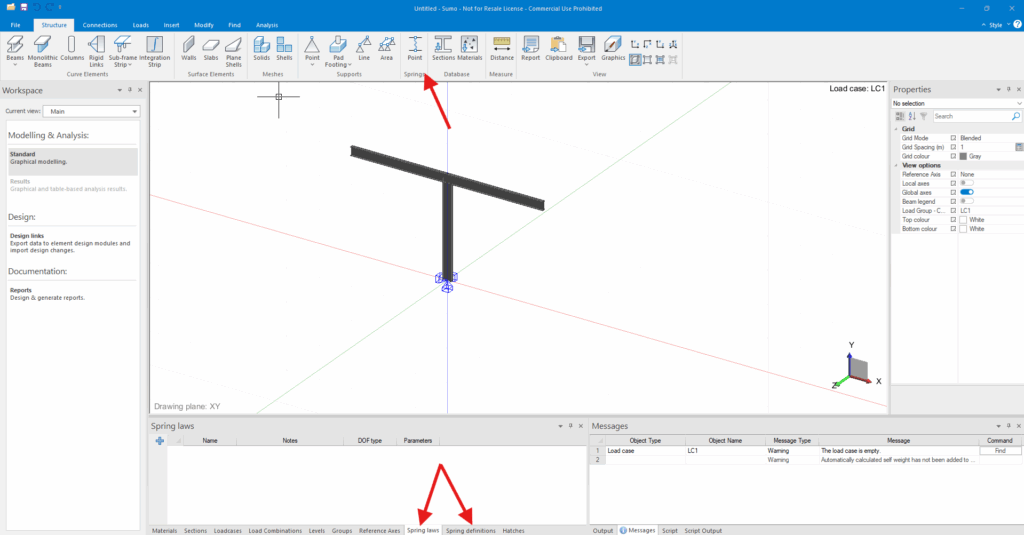
Step 1: Defining Spring Laws
The first step is to define the fundamental behavior of your spring in the Spring Laws tab. A “law” is a set of rules that dictates how the spring resists movement. Here, you will define the following properties:
- Degree of Freedom (DOF): You can specify laws for Translation (movement along an axis) and Rotation (bending around an axis). These are defined separately but can be combined in a single spring definition later.
- Symmetry: By clicking the button in the “Parameters” cell, you can specify if the stiffness is symmetric (the same in both directions) or asymmetric (different for positive and negative displacements). In this same window you will also define the Stiffness Curve:
- Stiffness Curve: Define the force-displacement relationship. You can choose from Linear, Bilinear, or Parabolic curves to accurately represent the connection’s behavior. This data can often be derived from specialized software like IDEA StatiCa’s Connection Stiffness Analysis.

Step 2: Creating Spring Definitions
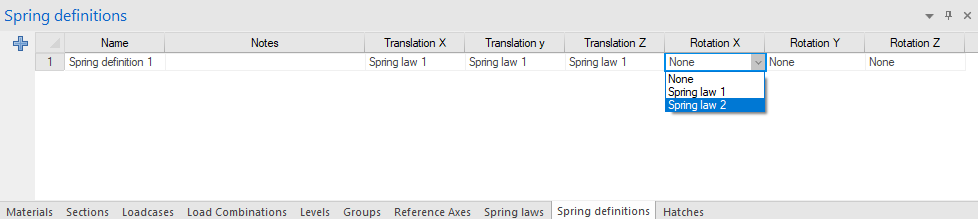
Once you have established one or more spring laws, you need to create a Spring Definition. This definition acts as a template that maps your abstract laws to the physical directions of a spring element.
In the Spring Definitions tab, you can assign a specific Spring Law to each of the local axis directions for both Translation and Rotation. This allows you to create a comprehensive, six-degree-of-freedom stiffness profile that can be applied to any spring in your model.
Step 3: Placing and Configuring the Spring
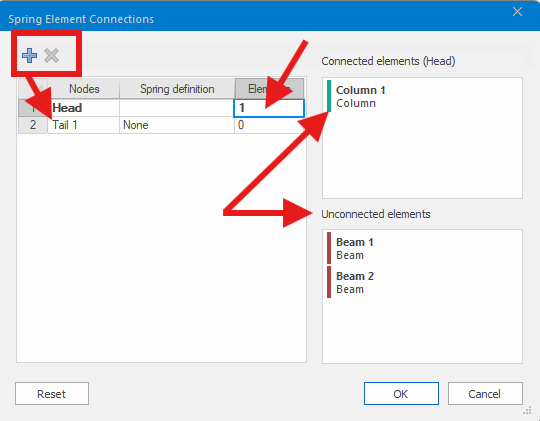
With your definitions ready, you can now place springs at nodes or member intersections using the Point command. A spring in SUMO is configured with a Head and one or more Tails:
- The Head: This is the single element that acts as the primary connection point for the spring.
- The Tails: These are all other elements connected to the same node. The spring models the connection between the Head and the group of Tails.
You assign elements to the Head and Tails by clicking in the “Elements” cell for each and selecting the desired members from the model. While a spring can only have one Head, it can have multiple Tails.
Spring Local Axes
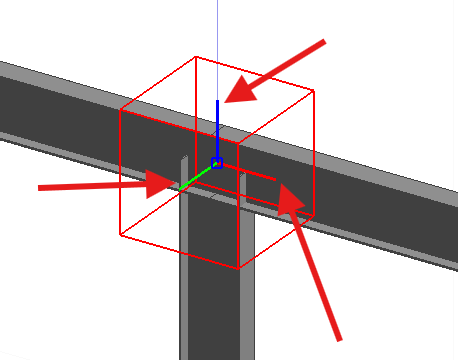
It is crucial to be aware of the local axes of the spring element itself. The stiffness properties you defined in the Spring Definition are applied according to these local axes. If the spring’s orientation is incorrect, you may inadvertently apply a strong bending stiffness in a direction that should have been weak, leading to inaccurate analysis results. Always verify the spring’s local axis orientation after placement.
Conclusion
This new workflow for non-support springs is a significant enhancement for structural engineers using Prokon SUMO. It provides the necessary tools to move beyond simple rigid or pinned assumptions and accurately model the real-world behavior of semi-rigid joints and complex connections. By correctly defining spring laws and applying them with careful consideration of local axes, you can achieve a higher level of precision and confidence in your structural analysis.
