

Overview
PROKON PADDS provides a comprehensive set of reinforcement detailing tools for producing reinforced concrete drawings and bending schedules. These tools allow reinforcement to be drawn to scale, fully described, and automatically scheduled in accordance with relevant detailing standards.
As reinforcement bars are created, modified, or labelled, PADDS dynamically updates the bending schedule to reflect the current drawing content. This ensures full consistency between drawings and schedules and significantly reduces the risk of errors.
The Rebar Commands form the core of reinforcement detailing in PADDS. These commands allow users to:
- Draw reinforcement bars
- Apply labels and descriptive text
- Assign shape and scheduling codes
- Record reinforcement in bending schedules
Before detailing begins, key parameters such as concrete cover, scheduling codes, and rebar drawing settings can be defined to ensure uniform detailing across the project.
Rebar Command Categories
Rebar commands in PADDS are grouped into three main categories:
General Rebar Commands
General rebar commands are used to create and manipulate individual reinforcement bars and manage scheduling data.
Available Commands

- Bar
Draws a single reinforcement bar to scale. - Bar ABCDE
Draws a bar using a predefined multi-point shape (commonly used for complex bent bars). - Dot
Indicates reinforcement bars in section views. - Ring
Creates circular reinforcement such as column ties or circular footing reinforcement. - Extend Bar
Extends an existing bar to a new length. - Concrete Cover
Defines the concrete cover applied to reinforcement bars. - Parameters
Sets rebar drawing parameters such as bar diameter, bend radius, hooks, and text styles. - Indicate Beam
Identifies beam geometry for automated reinforcement placement. - Curtail Bar End
Shortens or terminates a bar at a specified location. - Rotate Bar (Y Sign)
Rotates the bar orientation about the Y-axis. - Rotate Bar (X Sign)
Rotates the bar orientation about the X-axis. - Bar Line Mode
Controls how bar lines are displayed in the drawing. - Tendon / Cable
Used for post-tensioned tendons or prestressing cables. - Scheduling Code
Assigns the appropriate bending schedule shape code. - Show All Shape Codes
Displays all available rebar shape codes for reference. - Verify Schedule
Checks the bending schedule for errors or inconsistencies. - Find Bar
Locates a specific bar in the drawing using its bar mark.
Regenerate Schedule
Updates the bending schedule to reflect all drawing changes.
Quick Zone Commands
Quick Zone commands are productivity tools that allow multiple reinforcement bars to be drawn, labelled, and scheduled in a single command. These commands are particularly effective for slabs, footings, and repetitive reinforcement layouts.
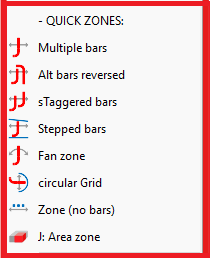
Available Commands
- Multiple Bars
Draws evenly spaced parallel bars within a defined zone. - Alternate Bars (Reversed)
Creates alternating bar layouts with reversed orientations. - Staggered Bars
Draws staggered reinforcement for crack control and load distribution. - Stepped Bars
Generates bars with step offsets, often used in sloped or stepped elements. - Fan Zone
Creates radial or fan-shaped reinforcement arrangements. - Circular Grid
Generates circular reinforcement grids, commonly used in round slabs or footings. - No Bar Zone
Defines areas where reinforcement is intentionally omitted. - Area Zone
Applies reinforcement over a defined area with automatic scheduling.
Indicating Drawn Bars
These commands are used to label and schedule reinforcement that has already been drawn, eliminating the need to redraw bars.
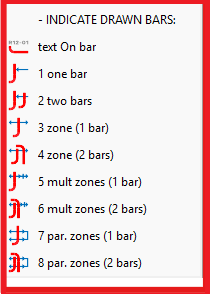
Available Commands
- Text on Bar
Adds descriptive text directly to a reinforcement bar. - Indicate One Bar
Labels and schedules a single bar. - Indicate Two Bars
Labels and schedules two identical bars simultaneously. - Indicate Zone with One Bar
Schedules multiple bars in a zone using a single bar definition. - Indicate Zone with Two Bars
Schedules a zone containing two bar types. - Multiple Zones with One Bar
Applies one bar definition across multiple zones. - Multiple Zones with Two Bars
Applies two bar definitions across multiple zones. - Parallel Zones with One Bar
Schedules parallel zones using one bar type. - Parallel Zones with Two Bars
Schedules parallel zones using two bar types.
Each category serves a specific role in the detailing workflow.
Best Practice Tips
- Always set concrete cover and rebar parameters before starting detailing.
- Use Quick Zone commands wherever possible to improve speed and consistency.
- Regularly run Verify Schedule to detect errors early.
- Regenerate the bending schedule after significant drawing changes.
- Use Find Bar to quickly locate and review reinforcement in complex drawings.
Summary
The rebar command system in Prokon PADDS provides a powerful, flexible, and highly automated workflow for reinforced concrete detailing. By combining precise bar drawing tools, zone-based reinforcement commands, and intelligent scheduling, PADDS enables engineers and technicians to produce clear, accurate, and code-compliant reinforcement drawings with confidence.
