

The Calcsheet in the Continuous Beam Design module allows you to compile input data, analysis results, and reinforcement design outputs into a clear and printable format. This Calcsheet can be printed directly or exported to Prokon CalcPad for further integration into project reports.
How to Collect Information in the Calcsheet
There are two primary methods to populate the Calcsheet with relevant information:
Using the Output Settings button
Click the Output Settings button and select the elements you wish to include. You may choose any combination of the following:

- Data File
- Input tables.
- Input sketches: cross-sections and an elevation showing the supports and dead and live loads.
- Deflection, shear and bending moment diagrams.
- Output file; complete or the support reactions only.
- Output table that summarises the cracked status.
- Tables listing the generated/entered reinforcement.
- Reinforcing layout diagrams
- Reinforcing graphs, showing required and generated/entered reinforcement.
Add Detailed Design Calculations
You may also extract detailed reinforcement calculations for flexure and shear:

- Select specific positions along the beam (measured from the left support).

- The system will insert full hand-style calculation steps at that location into the Calcsheet.
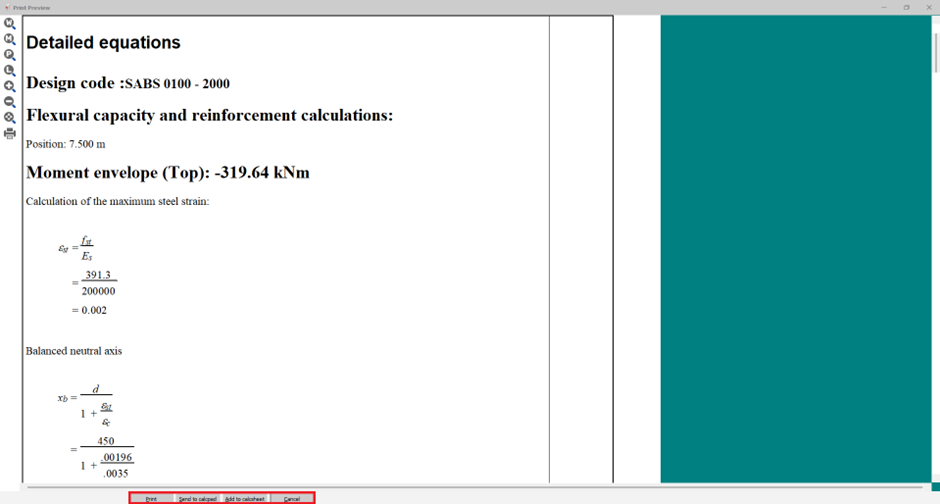
- These are useful for verification or client submission.
Recalling a data file
If you enable the Data File option before sending the Calcsheet to Calcpad, you can later recall the design by double-clicking the relevant object in Calcpad. A data file embedded in Calcpad is saved as part of a project and therefore does not need to be saved in the design module as well.
Summary
| Feature | Description |
| Output Settings | Select specific items (data file, input sketches, diagrams, etc.) |
| Data File | Enables later recall and editing from within CalcPad |
| Detailed Calcs | Manual-style flexural and shear design breakdowns |
