

This overview explains the Composite Beam Section Design Module, highlighting:
- Fundamental input parameters
- Summary of design results
- Important detailed equations in the calculation sheet
- Code support and configuration options
Code of Practice Support
The module currently supports:
- Europe -Eurocode 4-2004
- South Africa – SANS 10162-1:2011
- United States – AISC 360 – 16 (LRFD)

Fundamental Input Parameters
- Deck Configuration
- You may choose:
- No deck
- Flat deck
- Ribbed deck:
- Parallel to beam
- Perpendicular to beam
- Corrugated deck:
- Parallel
- Perpendicular
- You may choose:
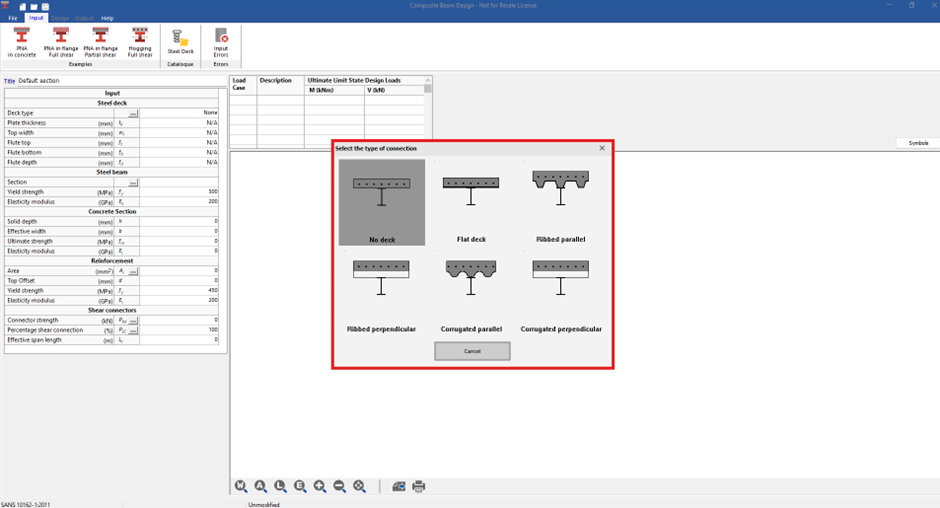
The module provides a dimensional sketch reference to guide correct input of deck dimensions.

- Steel Section Selection
- The module supports:
- Standard I-sections and H-section if you have selected the South African Code of Practice
- The module supports:

- Concrete Slab Parameters
- You must define:
- Slab thickness
- Effective width (as per code guidelines)
- You must define:
The effective width is calculated according to Eurocode provisions for composite action.

- Reinforcement
- The following are available to define the reinforcement:
- Enter the area of reinforcement directly, or
- Input:
- Bar diameter
- Bar spacing
- The following are available to define the reinforcement:
The module will then automatically calculate the area of steel provided.

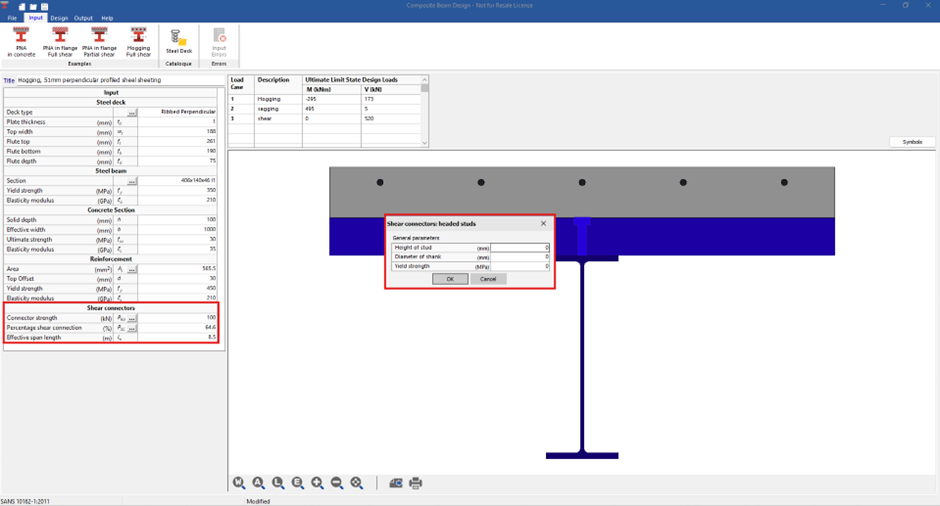
- Shear Connectors
- Shear connection is provided to transmit the longitudinal shear force between the concrete and the structural steel element. Ignoring the effect of natural bond between the two elements.
- You have two options:
- Manual Strength Input
- If product-specific technical data is available, you can:
- Enter the connector strength directly
- If product-specific technical data is available, you can:
- Automatic Calculation
- Specify:
- Shank height
- Diameter
- Yield strength
- Specify:
- Manual Strength Input
The module calculates connector resistance according to the code selected.
- Percentage Shear Connection
- You may:
- Specify a percentage shear connection, or
- Enter the number of shear connectors, and the module will determine the percentage connection per code requirements.
- You may:
Load Input
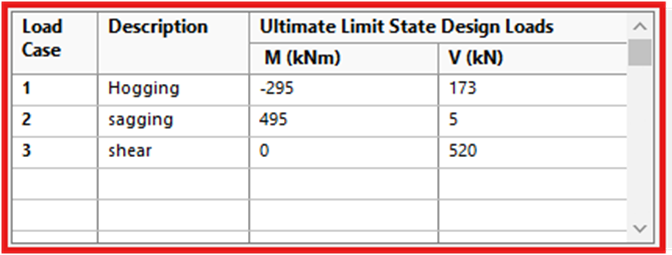
Moments and shear forces are entered in the Loads Table.
Sign convention:
| Value | Meaning |
| Negative Moment | Hogging |
| Positive Moment | Sagging |
You can input:
- Bending moments
- Shear forces
- Multiple load cases
Summary of Design Results
Results Tab Overview
The first tab provides a summary of:
- Sagging resistance
- Hogging resistance
- Vertical shear resistance
- Shear connector resistance

Design Philosophy
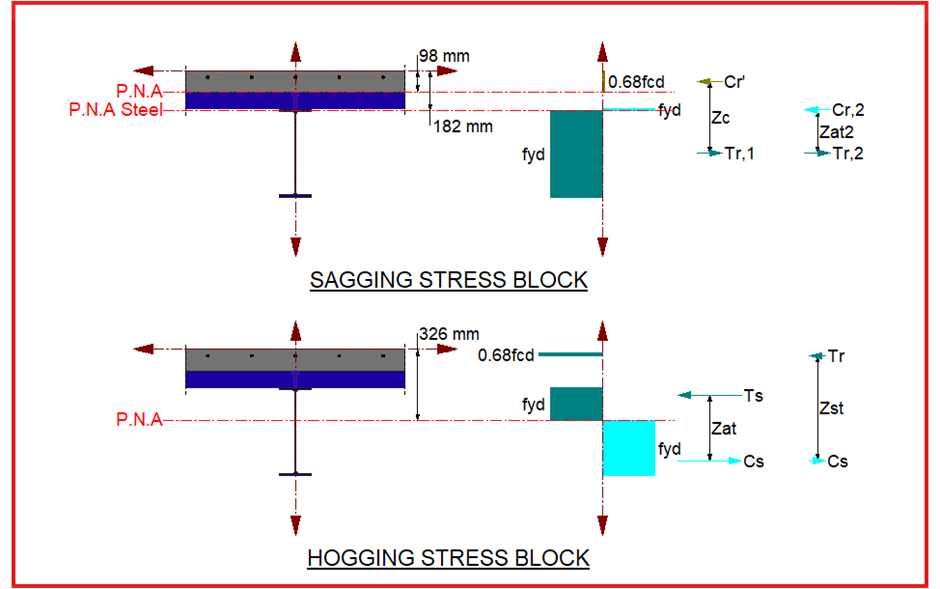
All PROKON composite modules are based on:
Rigid Plastic Theory
Therefore, schematic stress block diagrams are shown for:
- Sagging (positive bending)
- Hogging (negative bending)
These illustrate:
- Compression zone
- Tension zone
- Neutral axis location
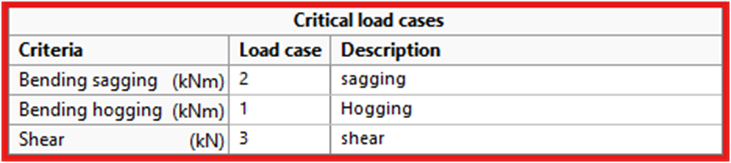
Load Case Results Tab
This tab identifies:
- Critical load case for sagging
- Critical load case for hogging
- Critical load case for shear
For each case, it displays:
- Applied action
- Design resistance
- Percentage utilization
This allows quick identification of governing conditions.
Checks Summary Tab
The Summary Tab shows:
- Pass / Fail status
- Code compliance verification
- Governing limit states
All checks are performed in accordance with code of practice selected

Calculation Sheet (Calcsheet)
The Calcsheet includes:
A. Project-Specific Input Parameters
- Steel section properties
- Slab dimensions
- Reinforcement
- Shear connector details
- National Annex parameters
Summary of Design Results
- Plastic moment resistance (sagging & hogging)
- Shear resistance
- Shear connector capacity
- Percentage shear connection
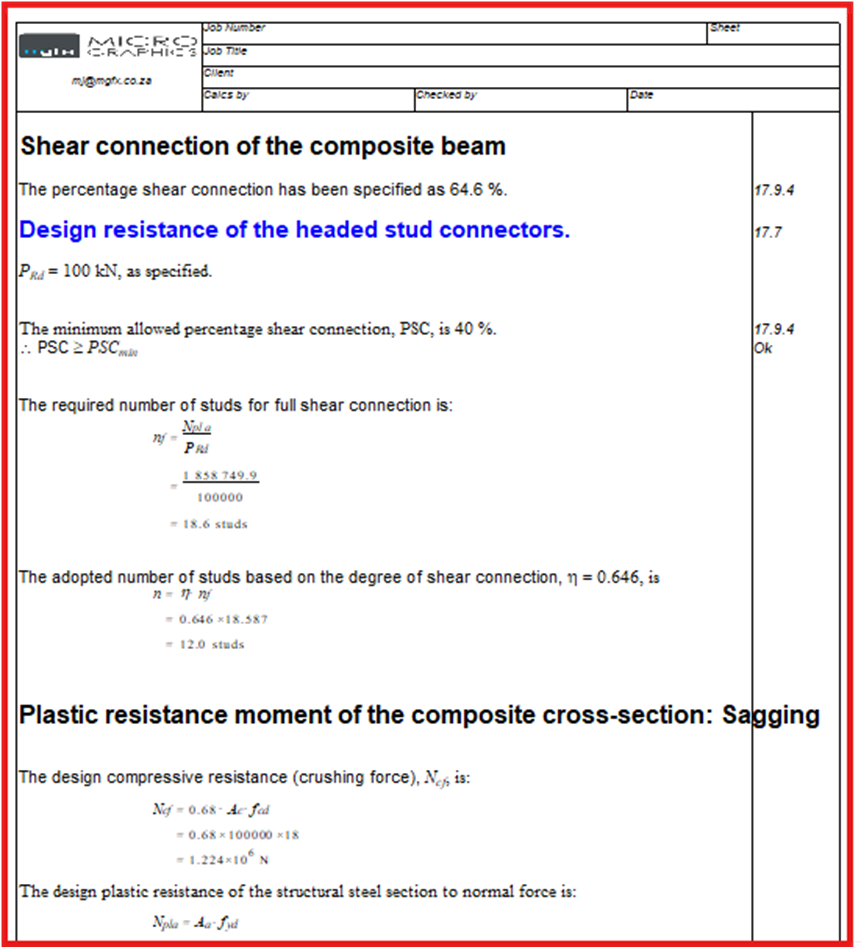
Detailed Equations Displayed
The Calcsheet provides detailed equations for:
- Shear connectivity
- Plastic resistance moment
- Vertical shear resistance
- Connector resistance
This ensures:
- Transparency
- Code traceability
- Submission-ready documentation
Key Engineering Insight
- Sagging regions rely on composite compression in the slab
- Hogging regions require reinforcement to resist tension
- Shear connectors control composite interaction
- Percentage shear connection significantly influences capacity
