

Bending Schedule Definition in PADDS
A bending schedule includes:
- Rebar details: number of bars, type, diameter, mark, shape code, cutting length, bending dimensions.
- Total masses per bar type/diameter.
- Schedule number (shown in title).
- Member descriptions and occurrences.
- Project details (title, date, detailer, drawing number, etc.).
Each schedule is embedded in its parent drawing and saved automatically with it.
- Use Page Break to divide into separate pages if required.
Field Designations

| Field | Description |
| Member | Optional description of the member being detailed. Type any description, using as many lines as needed. |
| Nmem | Number of members; This value is multiplied with the number of bars to get the total number of bars. |
| Nbar | Number of bars. |
| Dia | Type + diameter (R, Y, T; diameters 8–40 mm). |
| Length | Cutting length (automatically calculated by PADDS in the case of standard shape codes.). |
| Tot N | Total bars. |
| Mark | Bar mark (The mark is an alpha-numerical string of up to five characters). |
| S C | Bending shape code. |
| A–E/r | Bar bending dimensions. |
Working with Bending Schedules
- Rebar information can be:
- Auto-recorded using rebar detailing commands, or
- Manually typed in.
- Bending schedules open automatically with their parent drawing.
- Toggle Hide/Show (S key at command line) to view alongside the drawing.
- Edited with standard text editing functions.
- Drawing and schedule are edited in separate windows but can be printed together.
Printing and Title Block Options
Bending schedules are printed using the Title block & Print button at the bottom of the schedule window. The active drawing’s bending schedule is superimposed on master bending schedules, which can be customised with company logos and language settings.
When you select Title block & Print, a dialogue box is displayed with the following elements:
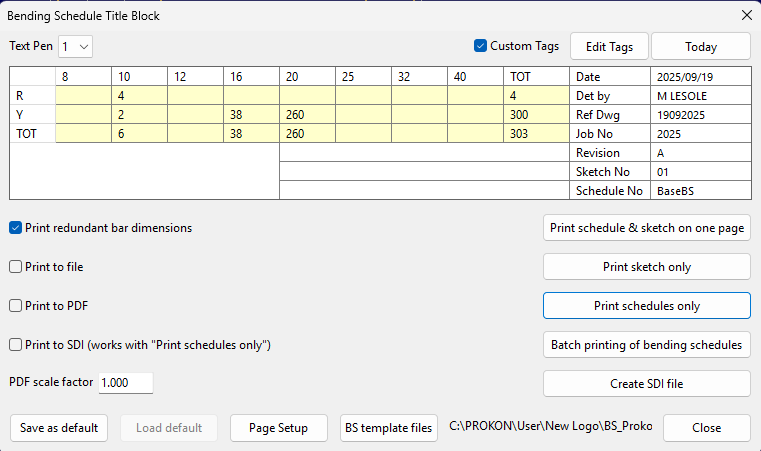
- Steel Quantity Summary: Auto-calculated total steel quantities.
- Editable Title Block: Can be customized for project details.
- Print Redundant Bar Dimensions:
- When ticked, redundant bar dimensions are shown on the bending schedule in brackets. If not ticked, then no redundant bar dimensions are shown on the printed bending schedules.
- Print to File:: If this option is selected, print files of the schedules and/or associated sketches can be created. These files can then be combined onto a large drawing or printed as a batch using the PROKON Batch Print module.
- Print Option Buttons:
- Select the required button to print the schedule and associated sketch on the same page, or to select either the schedule or sketch which is then printed on its on page.
- Create SDI File: Generates an SDI file for Steelpac, commonly used at bending yards.
⚠️ Note on Sketch Scaling:
When including a sketch (drawing) in a bending schedule, the sketch is sometimes scaled to make it fit into the designated area. If however, page breaks inserted in the bending schedule do not leave sufficient space on the schedule page for the sketch, the sketch is then superimposed onto the schedule. Adjust the schedule page lengths to correct this.
Bending schedules in PADDS provide a complete, embedded record of reinforcement, automatically updated with drawings, and ready for printing or export to bending yards.
